
Quiet a home golf simulator by finding where the noise travels
Listen to the same shots in the bay and in the room where someone hears the noise. Panels may reduce the echo in the bay. If a thud is still audible upstairs, find out how it travels before buying more panels.
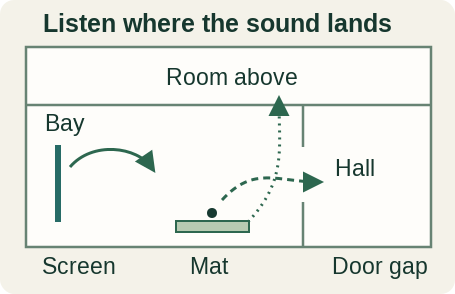
Which sound are you trying to reduce?
- At the tee. A club striking the ball makes a sharp sound. If the club also contacts the mat, listen for a separate thud near the floor. Use the same club and type of normal shot each time so the conditions stay comparable.
- At the screen. Listen for the second impact and any rattle from the frame. Check the model’s rear gap, attachment and edge protection before any adjustment. Carl’s Place identifies a noise-dampening centre layer in its Premium screen. That design detail gives no measured reduction for your room. Carl’s DIY kit screen options.
- In the room. Listen for sound that lingers after the strike. Absorption addresses reflections inside the room. If another room still hears the event, map the possible paths through openings or the building structure. The US General Services Administration’s acoustic design guide distinguishes absorption from blocking transmission. GSA acoustic design guide (PDF).
Is a net quieter than an impact screen?
Start with which strike is bothering the listener. A net can change the sound of the ball arriving. The club strike and any mat thud still happen. If you use a TV or tablet, you can try a proper net and avoid paying for projection fabric solely to change the impact sound. If you want projection, start with a screen and attachment system designed for your enclosure.
Net with an impact target
Spornia’s SPG-7 includes a target sheet that the manufacturer describes as impact- and noise-reducing. Verify the installed target, net flex, rear clearance and side and overhead containment. Use it as a candidate for a separate-display setup. The description supplies no directly comparable result in the room next door. SPG-7 target and net · Check net fit and storage.
Screen with a dampening layer
SimSpace Platinum uses a foam centre between layers. The maker’s separate Noise Absorbing Backing Screen is made to sit behind its compatible standalone impact screens. Keep the exact clearances and verify that combination with the maker. Carl’s Place Premium uses a noise-dampening centre layer. Its V06 instructions call for at least 12–16 in behind the screen and enough give to absorb strikes, and describe a trade-off between tension and bounce-back. Avoid fixing noise by stretching fabric tight or packing the moving gap. SimSpace materials and compatible backing · Carl’s Premium construction · Carl’s V06 screen care and use.
Mute the game audio for both tests. Use the same club and type of ball, play comparable shots and keep the door in the same position. If a compatible new target makes the second impact sound softer in the bay but the room above still hears the same thud, check the mat, frame and building route before buying another screen. These product descriptions give no side-by-side measurement in the same bay or indication of what a neighbour will hear. Record the listening conditions so a specialist can repeat the check if needed.
When acoustic foam will help
Try absorption if the unwanted sound is an echo you hear in the bay. Choose a product specified for absorption and keep it clear of club travel, fittings and the ball path unless its intended use covers the context. If the complaint is in the house next door or a room upstairs, record sound there and look at how it travels before asking for building work. A quieter echo in the simulator is one observation. Noise through a shared wall, an opening or the structure needs a separate receiving-room check. GSA acoustic guide on absorption and transmission
How loud is a golf simulator indoors or in a garage?
An acoustician’s case study reports tested peaks of 87–98 dBA at an operating InHomeGolf simulator facility, with the greatest measured energy in the 125–250 Hz bands. That gives an example from a working indoor bay. The public report does not specify enough about the test positions, shot set and room to calculate what a separate home will hear. InHomeGolf acoustician’s case study.
A garage owner recorded a few drives into a net with the garage door closed, before putting in the screen, rubber floor or side curtains. Decibel X on their iPhone displayed 100.4 dB maximum and 105.5 dB peak in the garage. The owner read the shots in the room above as about 54 and 58 dB from the plot, and identified their own door closing as the reported maximum there. They did not document weighting or calibration. Treat this as one owner’s listening trial and an example of why to log door movements. Use the same conditions and a suitable meter before comparing noise across different homes, room positions or treatments. Garage owner’s original closed-door test notes · NIOSH on the limits of impulse measurements.
Make a before-and-after listening log
What a published driver measurement can tell you
In a 2013 experiment using ten titanium drivers, researchers reported an average 119.9 dBA sound-pressure peak at 1.7 m in front of the hitting point and 111.6 dBA at 3.4 m in front. The same experiment reported 100.0 and 96.5 dBA for its overall octave-level measure. These readings apply to club-on-ball impact under the stated test conditions. The screen strike, garage door, adjacent room and garden boundary each need their own observations. Ryu et al., driver impact noise study.
In a garage, listen inside the house and in your own outdoor space if relevant. Inside a house, include the room above and hallway if both are affected. For a measured result, specify the actual receiver and purpose so an acoustician can select suitable impulse and longer-period readings. NIOSH guidance on measuring impulse noise.
Start with a correctly installed hitting bay and keep listeners clear of the swing area and ball path. Write down the club, shot type, mat and screen, door and window positions, and whether the projector or fans are running. Choose short, repeatable sets of ordinary shots. Take notes in the same places, with the same listeners if possible.
| Listening point | Notes to keep |
|---|---|
| Protected position in the bay | Which sound stands out? Listen for the club, screen impact, rattle or lingering echo. |
| Hall or room through a door | How clear is the sound with the existing door in its normal positions? Record the door position each time. |
| Affected room above or beside the bay | Does the listener hear a sharp crack, a dull thud or both? Keep their listening point fixed. |
| Own outdoor space, if relevant | Record the position, doors and background noise so a repeat is comparable. |
Change one thing and repeat the same set. Use ordinary descriptions such as audible, faint or unchanged. NIOSH’s impulse-noise research describes why capturing a short peak accurately can require specialised equipment. If you need a verified reduction, or evidence for a dispute or building specification, ask the relevant professional or authority what measurement is required. NIOSH impulse-noise measurement.
If the hall improves and the room above still hears a thud
In one illustrative log, the listener in the hall hears a sharp impact with the door open. Closing the existing door makes that impact faint in the hall. The listener in the room above still hears a low thud during the same shot set.
Keep the existing door in the playing position that helps the hall, with exits available. Give an acoustic installer the before-and-after notes and the position of the mat, screen frame and room above. Ask them to check the routes through floor, ceiling, openings and ducts before specifying the work. The log shows that closing the door changed what people heard in the hall. Ask the installer to trace the route upstairs.
Connect a golf simulator sound system
Start with the host that makes the sound. A PC, TV or projector can handle the game audio while the launch monitor sends shot data. Use the existing speaker first. If you can hear cues clearly from the hitting position at a volume that suits the household, you can skip a new purchase.
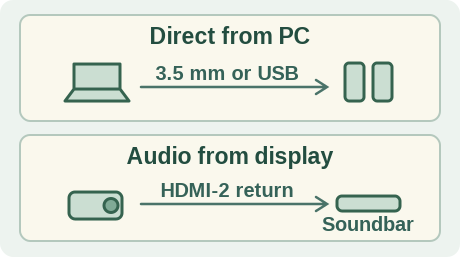
One PC source
Keep the HDMI picture connection to the display and send sound directly from the PC. Logitech’s Z407 powered speakers, for example, accept a wired 3.5 mm or micro USB audio connection as well as Bluetooth. If your PC has a suitable analogue output, connect it to 3.5 mm and select that output on the PC. Check the actual input and cable length before fitting the speakers. Run a cue in the golf app and adjust the volume from the hitting position. Logitech Z407 input options.
Audio follows the selected picture
The BenQ AH700ST menu offers the internal speaker, a 3.5 mm output or Audio Return+. For a compatible soundbar, such as one with the HDMI eARC/ARC port documented on the Sony HT-S2000, put the video source on the other HDMI input. Use the AH700ST’s HDMI-2 and the soundbar’s labelled return port, and enable Audio Return+ and the bar’s ARC/eARC function. Check the actual audio format and the soundbar’s output with the intended source before mounting. The ports make this a connection to test. Verify the exact pair in your room. BenQ AH700ST Audio menu · Sony HT-S2000 return connection.
Compare sound with the ball stopped before comparing impact with the speakers muted. Place speakers where they can be heard at modest volume, with a clear cable path. A soundbar changes game audio. Treat any club, mat or screen noise at its own source. Check the display and host connection.
What should the installer test after the work?
Give the installer the source, the affected room and your before-and-after notes. Ask what they propose to change and how they’ll repeat the same test at the same listening point. For a neighbour concern, check the rules and process for your area. UK readers in England can start with Defra’s statutory noise guidance. US readers can look up their city or county’s requirements.
Record your baseline Add the work to your quote sheet Check the existing screen setup