
Choose a launch monitor for home golf
Measure behind the tee, beside the ball and up to any proposed ceiling mount. Eliminate monitors you can’t place, then compare what the others will read, what runs the app, and how much it costs to keep playing.
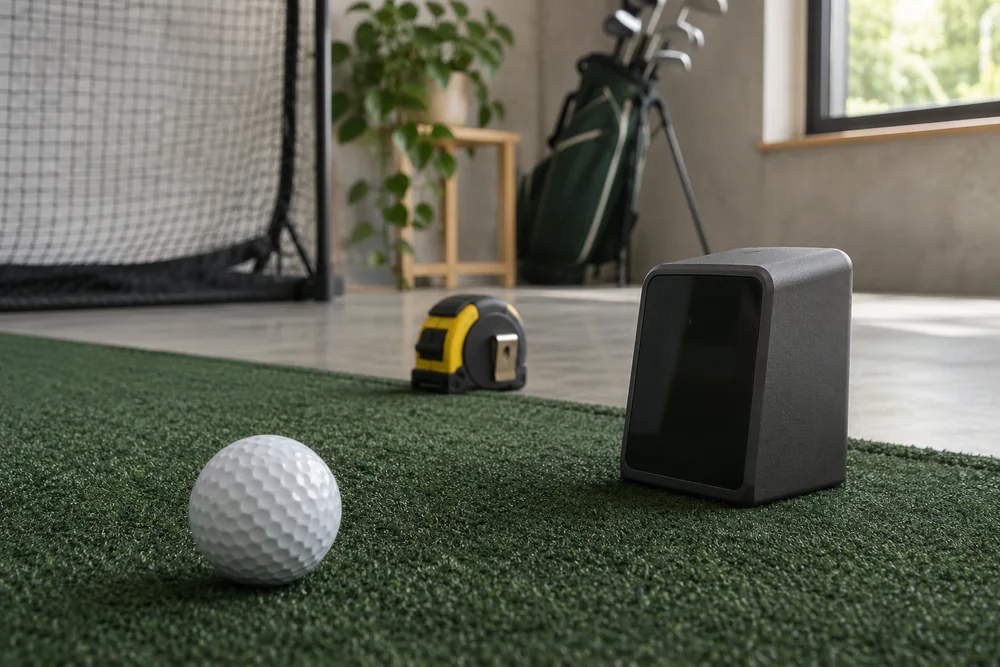
Where can the monitor go?
Measure usable depth behind and ahead of the ball, a place beside the ball for each handedness, and height from finished turf to the proposed mount. Record the screen or net clearance separately. Take the dimensions to the launch monitor placement guide.
Behind the ball
Start with Garmin Approach R10 or Rapsodo MLM2PRO if you can preserve a rear position on the target line each time you set up. The R10 manual gives 6–8 ft behind the tee and at least 8 ft from tee to indoor net. Rapsodo specifies 6½–8½ ft behind the ball and 8 ft of flight to the net. Garmin R10 manual · Rapsodo MLM2PRO setup FAQ
Compare the R10 and MLM2PRO in one measured bay. For FlightScope, check Mevo generations, depth and ball requirements.
For a permanent or shared bay, compare Trackman iO with Trackman 4. For a portable side-mounted unit, compare the GC3 and GCQuad data and purchase options.
Beside the ball
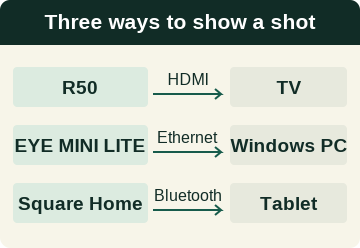
Consider Square Golf Home, Garmin Approach R50 or Uneekor EYE MINI LITE if the tee has a usable side position. Tape out the case and cables for right- and left-handed play. Then check that each golfer can swing and that the bay can contain their shots. Square Golf Home setup · Garmin R50 placement · Uneekor EYE MINI LITE setup (PDF)
Compare beside-ball units for both tee positions. Compare Square Home with SKYTRAK+ or check the three SKYTRAK generations.
Overhead
Consider overhead mounting if the bay stays up or right- and left-handed golfers often take turns. For Trackman iO, match the height from finished turf and the horizontal mount location to the specific unit and its installation instructions. Check the door travel and projector in the same plan. Trackman regional installation instructions · Check garage ceiling and door clearance
Write down the feedback you will use
- Gapping irons. Check carry and ball speed in the practice mode you will use. Confirm how the software reports carry and whether you can save or export sessions.
- Working on shot shape. An ordinary ball is enough for basic practice modes on the R10 or MLM2PRO. Rapsodo measures spin rate and axis on its designated RPT balls with MLM2PRO Core or Studios. Garmin supports Titleist RCT to help its R10 radar capture spin rate indoors and can still estimate the value if the signal is insufficient. Square Home uses its own marked balls for measured spin and has separate club stickers for extra club feedback. Match each marking to the exact device and number you want. Rapsodo ball FAQ · Rapsodo spin and plan table · Garmin RCT capture · Square Home marked balls · Square club stickers
- Playing rounds and finishing holes. On the R50 you can enable putting in Home Tee Hero, with a separate distance for automatic gimmes. An R10 Home Tee Hero round assigns strokes based on proximity once the ball reaches the green. If you want to play the putt yourself, ask for an actual putt from outside the gimme distance in the demo. R50 simulator settings (PDF) · R10 virtual round scoring
UK and US prices for two entry-level monitors
For a net, supported phone or tablet and enough rear depth, compare the Garmin Approach R10 and Rapsodo MLM2PRO. These are hardware listings checked on 21 November 2026.
- UK. GolfBays showed the R10 in stock at £421. Rapsodo UK offered the MLM2PRO at £399. GolfBays R10 · Rapsodo UK MLM2PRO.
- US. The Indoor Golf Shop offered the R10 at $499.99. Rapsodo US offered the MLM2PRO for $399.99 in its 19–30 November promotion. The Indoor Golf Shop R10 · Rapsodo US MLM2PRO.
Choose by practice goal. With 6 ft available behind the tee and at least 8 ft from tee to net, the R10 reaches the lower end of its stated rear range. The MLM2PRO calls for 6½ ft or more behind the ball. At a usable 7 ft behind the tee, both rear ranges overlap. If you want to work on spin axis as well as carry, price the MLM2PRO’s required RPT balls and eligible membership before comparing the two hardware prices. If you can’t preserve either rear position, use the beside-ball route above. Confirm the device, taxes, delivery and what is included. Compare the measured fit, apps and ownership costs.
What the indoor accuracy tests tell you
2026 Foresight GC2 for indoor ball data. MyGolfSpy tested 17 personal launch monitors and recorded more than 500 shots overall against a GCQuad. It named the new GC2 the most accurate indoors in that test, narrowly ahead of the Bushnell Launch Pro. The Launch Pro led the group’s overall accuracy across indoor and outdoor testing. The new GC2 uses two cameras to measure the ball. Shortlist it for ball data. If you need club path or another clubhead measurement, check which devices report that specific number. MyGolfSpy’s 2026 test and method.
Price course access separately. On 21 November 2026, the £1,695 UK offer included 12 months of Silver and Course Pass, with paid continuation for membership features. The $1,699 US reservation advertised the first year of both for a limited time. After that, Foresight’s separate US rates are $199 for Silver and $295 for Course Pass, or $494 a year before tax if your account has no eligible FSX licence. Check the courses you want on your account. UK GC2 offer · US GC2 reservation · US plans and FSX eligibility.
MyGolfSpy’s February 2026 comparison reported the following average percentage differences from a Foresight GCQuad indoors. These figures answer how closely each unit’s results matched that reference in this test.
- Foresight GC3. Carry 1.5%, ball speed 0.4%, launch angle 3.5% and spin rate 2.0%.
- Garmin Approach R50. Carry 2.2%, ball speed 0.3%, launch angle 2.5% and spin rate 1.5%.
- Rapsodo MLM2PRO. Carry 1.4%, ball speed 0.3%, launch angle 1.5% and spin rate 1.5%.
For gapping irons, use the carry figures to choose models to try. The MLM2PRO’s reported carry difference was 0.1 percentage points smaller than the GC3’s. The benchmark was another launch monitor. Averages can hide large misses, dropped shots and variation between repeat readings. Take that narrow gap as a reason to try both models, and apply the results only to the equipment and conditions tested. MyGolfSpy’s indoor comparison.
Which result matters for you? Foresight’s GC3 and GCQuad use three and four cameras respectively. Use the comparison above to shortlist a monitor for ball data. If your decision depends on a club metric, check that individual metric in a matched test. For example, an indoor study by Bliss and Langdown found that FlightScope Mevo+ and Trackman 4 had poor consistency for angle of attack on 7-irons and pitching wedges, even though many other metrics showed better agreement. A strong result for carry tells you little about angle of attack on a different device. Foresight’s model comparison · Bliss and Langdown’s indoor study (PDF).
In a separate 2017 study, Leach and colleagues compared the older TrackMan Pro IIIe and Foresight GC2+HMT with a GOM optical benchmark. Eight golfers hit 240 shots in total using a driver, 7-iron and wedge. Ball measurements agreed more closely with the benchmark than clubhead measurements overall. If you buy specifically for club path or face feedback, ask for a demo of that exact metric with your club and setup. The 2017 results apply to the tested legacy hardware. Co-author Jon Roberts’s study summary.
Check whether the monitor reads your shortest chip
In the return window, choose the shortest chip you expect to play in the app and hit several from the marked ball position. Start in the maker’s own practice mode, then repeat in the course app from the same spot. Record which shots register. If full shots appear but soft chips disappear in both apps, you’ve found a limitation to check before the return window closes.
For the R10, Garmin suggests observing the status LED during a no-ball rehearsal. A short swing that leaves the unit in its ready state may need more backswing speed or length for detection. Use the feel of your normal chip for the purchase test. If you need a distinct option, use the beside-ball R50 in its marked zone in the same app and repeat the same short shot rather than assuming it will work from a product data list. Garmin missed-chip guidance · Garmin R50 indoor setup · Run the R10 chip diagnostic.
Used OptiShot 2 as a local practice setup
The OptiShot 2 is a USB infrared swing pad that reads the club. The original quick start demonstrates its read with short swings and no ball. Choose it for that kind of club feedback. If you want to measure the ball’s launch or spin, shortlist a monitor that supplies that data. Original OptiShot 2 hardware and practice checks
Red Stakes Golf says OptiShot 2 hardware and software support has reached end of life. Its reduced local Windows build, 3.2.1.3209, lists Windows 10 with S mode disabled as the minimum. The publisher’s page leaves Windows 11 compatibility unconfirmed. It says macOS support ended and online play and premium courses were removed. The current build uses publisher instructions for local play without a product key. Current OptiShot 2 software and limitations
Golf Swing Systems displayed £349 in the UK and Rock Bottom Golf displayed $349 in the US on 21 November 2026. Both listings showed out of stock. For a private sale, price only the hardware and local modes you can see working. UK OptiShot 2 listing · US OptiShot 2 listing.
Second-hand examples. On 22 November 2026, a Gumtree seller in Blandford Forum was asking £125 for collection of an OptiShot 2 in its original box, with the ball and tee missing. The listing has since closed. A Scottsdale OfferUp seller displayed a $150 asking price with an offer button, but current stock is unconfirmed. A separate US eBay listing for the pad with a practice net shows $125 and sold status. These prices reflect individual offers or past listings. Confirm the working hardware and current software features. Some seller ads still quote discontinued online play. US private ask · US sold listing.
Before paying, ask for a demo of the exact pad and USB connection in a working local practice session. Check the publisher build on the Windows computer you plan to use and view the courses still available locally. Older sign-in or course purchases provide no basis for pricing access in this build.
US used buying options. On 21 November 2026, a Texas seller on SidelineSwap showed one used OptiShot 2 for $181.90 before delivery with Add to Cart and described its condition as excellent. A California seller showed $175 with Buy It Now and described a working OptiShot 2 in the listing. Check the label because the headline says OptiShot. The Franktown, Colorado, seller’s $140 option was a Make offer ad. Confirm the USB cable, delivered price and a local Windows practice session. Texas OptiShot 2 listing · California seller’s listing · Exact model in the seller description · Franktown offer.
Before paying a secondhand seller, verify the OptiShot 2 computer, software and activation path.
Worked choice for a garage with a TV and no spare computer
Suppose one player has a usable side position, an HDMI TV and a supported tablet, but no Windows PC at the hitting station. They want to practise, play 18 holes once a month and putt from the mat. The comparison uses UK prices checked 21 November 2026. These costs exclude hardware, balls, a new host and any separate third-party licence.
- Garmin R50 for the TV. The R50 runs practice and can send practice or virtual rounds directly to a TV with HDMI. Budget £89.99 per year at the checked UK iOS Garmin Golf price for Home Tee Hero course play, including the option to putt. Recheck that annual charge when renewing. Garmin HDMI setup · Garmin UK annual price. Compare the R10 and R50 for placement, display and short shots.
- Square Golf Home for the tablet. The Square app includes range and putting practice. One player × 18 holes × 12 sessions = 216 credits, so year one costs £0 extra with a new device’s 1,000 welcome credits. The remaining 784 credits carry over. Once used, the current £5.99 pack of 220 covers another 216 player-holes. Prove the tablet-to-TV connection with the app if the big screen is essential. Square Bluetooth and host setup · Square UK practice and credit prices · Square credit expiry FAQ
- Uneekor EYE MINI LITE if you add a PC. Its included Player plan has a virtual driving range. Uneekor listed its UK Pro plan with five Refine courses at £150.81 per year, billed annually. Keep this quote on hold until a compatible Windows PC, Ethernet and power route are in the plan. Verify the putting mode in the chosen software during a demo. Uneekor PC setup (PDF) · Uneekor UK plans
Price the first playable setup
For each model that fits, price the monitor, balls, the device that runs the app and any software you’ll pay for. Write down the first bill and the amount you’d pay to keep the same practice or course features after the included term.