
FlightScope Mevo Gen2 vs Mevo+ indoors
Measure from the tee to the radar and from the tee to the net. A room can meet the Mevo Gen2’s Limited Flight minimum and still fall short of the ball flight FlightScope recommends for full swings on the Mevo+.
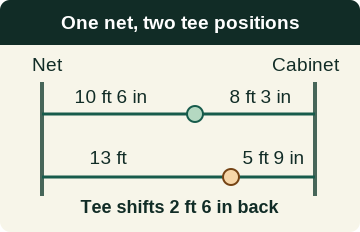
Worked choice with 18 ft 9 in available
Suppose the plane of the installed net and the face of a rear cabinet are 18 ft 9 in apart after allowing room for the net. The proposed tee has 8 ft 3 in to the cabinet and 10 ft 6 in of ball flight to the net. For Gen2, FlightScope lists 7–9 ft sensor to tee in Limited Flight, with at least 8 ft of ball flight. The quick start uses 8 ft behind the ball as its full-swing setup. That reference point is 3 in from the cabinet face, so mock up the full device and foot before ordering. Gen2 distance FAQ · Gen2 setup guide
The Mevo+ FAQ also lists 8 ft as a Limited Flight minimum. Its product page recommends 13 ft for indoor full swings. Getting 13 ft here would leave only 5 ft 9 in behind the tee, below the published 7–9 ft rear range. Shortlist the Gen2 for an exact-layout trial. If considering Mevo+, have the seller verify the approved short-flight profile and demonstrate the intended clubs at 10 ft 6 in of flight. Mevo+ Limited Flight FAQ · Mevo+ recommended setup
These are example room measurements. In your room, check that the club can swing clear and the net has space to move. Enter the measured distance when you set up the radar.
Confirm the generation before paying
- Original Mevo. FlightScope’s legacy model uses Doppler radar and gives eight data parameters in its practice workflow. Its first-party guide describes FS Golf practice. Check the label before buying. The original is for FS Golf practice. Look at Gen2 or Mevo+ if you want the Fusion Tracking or bundled courses described below. FlightScope generation overview
- Mevo Gen2. FlightScope lists radar and camera Fusion Tracking and eight new-purchase E6 CONNECT courses for iOS and PC. The UK manufacturer’s Gen2 page showed a sale price of £1,020 from £1,199 on 21 November 2026. The included E6 bundle needs no recurring FlightScope fee. Gen2 specification · Gen2 UK offer checked on that date
- Mevo+. Current 2024 Edition documentation lists 12 E6 courses on iOS and Windows PC. Check the edition and redemption status on older or used offers. FlightScope’s UK FAQ says the original Mevo+ iOS bundle does not transfer to the next owner. Price an eligible new licence if the seller cannot transfer the required access. Mevo+ product and courses · UK transfer guidance
Set up the ball for spin and the lane for putts
For accurate indoor spin in Limited Flight, FlightScope lists its metallic dots or Titleist RCT balls for Mevo Gen2 and Mevo+. Follow the orientation instructions for the exact ball or sticker. These are setup requirements for spin capture. Check how your intended app displays the result. FlightScope limited-flight rules
Measure the putting lane separately from the full-swing setup. The current FAQ lists 5 ft sensor-to-tee and recommends at least 8 ft of flat roll for both Gen2 and Mevo+. Mevo+ product instructions elsewhere give different references for the putting setup. Confirm the selected device, app and calibration before moving the sensor. A 7 ft 6 in flat lane in the example falls short of the FAQ recommendation by 6 in. Current putting FAQ · Mevo+ modes and setup
Price course play and extra metrics separately
For either newer model, FlightScope lists a one-time Pro Package with Face Impact Location linked to the unit. It adds data and no extra E6 courses. Gen2’s FAQ also lists GSPro on PC and Awesome Golf on PC and iOS. Check the app’s own current licence before adding its line item. Ask the seller to name the device, app, ball and computer or tablet on the quote. Give them both tee distances and the mode you’ll use, and confirm which software licences you can activate in your own account. FlightScope add-on scope · Supported software and host