
Golf simulator balls, radar dots and club stickers
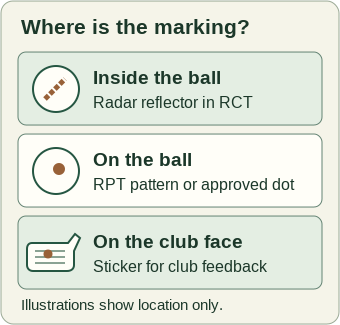
For spin, check what your monitor can read. Compatible radar units can use the reflector inside a Titleist RCT ball. Rapsodo uses the visible pattern on an RPT ball. If you want club data, check whether your camera monitor needs a sticker on the club face.
Find balls for your monitor Check which spin figures are estimated
Which ball should you buy for your monitor?
Garmin Approach R10
A clean regulation ball works for ordinary practice. If you want the R10 to measure spin indoors, Garmin supports Titleist RCT and gives specific placement and distance instructions for it. Garmin warns that stick-on metallic marks can worsen R10 performance. R10 RCT guidance · Garmin radar and metallic-mark guidance · Titleist UK Pro V1 RCT
FlightScope Mevo+ or Mevo Gen2
For limited-flight spin readings, FlightScope specifies either Titleist RCT or an approved aluminium dot. For the Mevo+, use one dot on a regulation ball and point it towards the screen. With the approved dot, you can use the regulation ball you play outdoors. Check FlightScope’s spacing and placement instructions for your Mevo model. FlightScope’s Mevo+ and Mevo Gen2 instructions
Rapsodo MLM2PRO or MLM2XPRO
Rapsodo specifies the RPT pattern for measured spin rate and spin axis, with a plan that enables those metrics. Look for RPT on the pack. Rapsodo’s UK and US stores list Callaway Chrome Tour with RPT. The Chrome Tour name alone tells you nothing about the pattern. In the Rapsodo Golf app’s Session Setup, select the RPT ball you are using and choose Net. The Range setting leaves measured spin unavailable even with an RPT ball. Rapsodo’s ball and environment settings · Rapsodo’s measured spin and plan table · Rapsodo UK Callaway RPT · Rapsodo US Callaway RPT
Square Golf Home
Use Square’s marked balls when you choose Measured spin on the Home. The Square app also offers a Calculation spin setting, and Putting Practice accepts an unmarked ball. Square’s Home and Omni have different tracking requirements. Check the exact unit and app mode before buying a box of marked balls. Square Home spin measurement FAQ · Square’s spin setting and putting mode
Worked R10 check for measured spin indoors
After confirming your swing, containment and monitor spacing, keep the tee and R10 in the same place. Garmin calls for at least 8 ft (2.44 m) from tee to net for RCT. Some shots may need more flight to measure spin. Open the Garmin Golf Driving Range. Hit six ordinary shots with a clean regulation ball and mark each spin reading as italic or non-italic. Repeat with six comparable shots using the RCT version of the same ball model if available. Italics identify estimated spin in this view. Garmin’s spin indicator and flight requirements
If all six ordinary-ball figures are italic and only one of the six RCT figures is italic, the R10 measured spin on five more shots with RCT. That count tells you how often it measured spin. Checking the accuracy of an individual reading requires a reference for the same shot. If most figures remain italic, check alignment, net distance and flight before buying more balls. If the manufacturer’s app never provides the read you need in your room, retest another supported setup before changing hardware. Check R10 position after the mat moves
What the indoor spin comparison measured
In MyGolfSpy’s February 2026 indoor comparison, average spin-rate differences from its GCQuad reference were 1.5% for the Rapsodo MLM2PRO, 1.5% for the Garmin R50 and 2.0% for the Foresight GC3. Those are spin-rate figures for the named units in one comparison. They do not establish spin-axis error or an R10-versus-MLM2PRO result. Original indoor comparison.
If your own readings differ, check the measured or estimated indicator before comparing the numbers. On Garmin’s R10, verify the Titleist RCT ball is captured as measured. On the MLM2PRO, use the correct RPT ball, Net mode and an eligible membership. Then retest the same club and ball across repeated centred strikes. A valid measured reading tells you the app captured spin. Comparing it with a reference for the same shot is a separate test. Garmin RCT support · Rapsodo ball and mode support · Compare the four tested metrics.
When club-face stickers are useful
Foresight’s GC3 family and Launch Pro units use a single club marker. GCQuad, QuadMAX, Falcon and GCHawk support a four-dot mode with the appropriate club analysis entitlement for data such as face angle and strike location. Use the diagram for your exact club and device. Confirm club-data access for the particular account and package, especially if you are buying used. Foresight marker and mode guide · Foresight club-data diagnosis
Uneekor EYE MINI and LITE use prescribed club-face stickers for club tracking. On EYE MINI CORE, first confirm the one-time Club Data unlock is active, then fit the stickers as instructed and test in VIEW. If a club reading is missing in VIEW, check that Club Data is active and that the sticker is in the prescribed spot. Uneekor LITE club markers (PDF) · CORE club unlock and stickers
What to confirm before ordering a dozen
Ask to see the reading you care about for one club with your monitor model, ball, app or plan and available ball flight. Check that combination before buying a dozen or paying for a new app. If you need to change the monitor or the room, revisit the launch monitor data checklist and its placement guide.
Manufacturer guidance checked 21 November 2026. The six-shot counts are illustrative.