
TV golf simulators with a swing stick or sensor
You can play golf on a TV with a motion-sensing stick and no ball. Check where you can swing the stick, which device runs the app and how it sends the picture to your TV. For measured ball flight or spin, you’ll need a launch monitor and a bay that safely contains real shots.
Compare the products Find the TV connection Price a setup and test your room
Swing-stick kits and real-ball practice
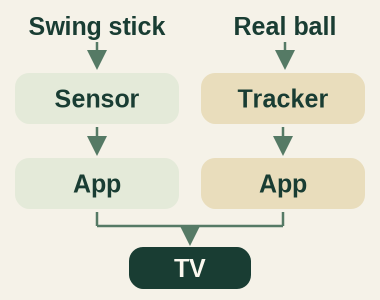
Pick a no-ball system for casual rounds, tempo feedback or sharing a TV in a room that cannot hold a hitting bay. A motion sensor reads the stick or club’s movement. The app uses it to simulate what the ball would do. For measured ball speed, launch or spin, budget a ball-tracking launch monitor and proper containment.
| Product | What goes on the grip | What you can expect |
|---|---|---|
| Phigolf 2 / Phigolf 2 Flex | Motion sensor with a practice stick. The Flex has a retractable stick. Pair the sensor to Phigolf and test the app you want. | The maker advertises course rounds, practice and challenges in its mobile ecosystem. The optional E6 Connect path has its own app requirements. Phigolf 2 Flex maker listing · Phigolf manufacturer FAQ |
| SwingLogic SLX MicroSim / former Tittle X | Motion sensor and the stick, clip or cradle specified by the kit. The checked MicroSim 2.0 package uses its non-telescoping Swing-Stick Pro. | The named kit displays a one-year E6 Connect entitlement to five courses. A historical Tittle X box or a basic pack can carry different terms. SLX Hybrid is a different product family. SwingLogic MicroSim 2.0 listing · SwingLogic product support |
| TruGolf Mini | TruGolf’s Mini sensor and practice trainer. Start the documented E6 Connect path and verify its product key. | TruGolf gives PC and iOS instructions specific to Mini. E6’s portal lists a five-course perpetual PC licence for Mini. Confirm what the seller includes and whether the key is usable before assuming course access. TruGolf Mini support and E6 setup · TruGolf Mini E6 Connect licence |
| Real balls into a net | Launch monitor positioned as the maker requires, a hitting surface, suitable net and a display outside the swing and ball paths. | Choose this setup if the goal is to see actual ball data and practise with your own equipment. Measure space and containment before selecting a monitor. Check net and space requirements · Compare launch monitors |
For family play, check whether everyone can reach the controls and swing the stick safely. Try a right- and left-handed swing in the intended spot and look for the app’s signal that it picked up each one.
Connect the sensor to the app and the app to the TV
- On Phigolf, install the app on the compatible phone or tablet and connect the sensor inside the app. The maker recommends mirroring from the mobile device to the TV. Check whether your phone or tablet and TV share a mirroring protocol. If you plan to use a cable, confirm the correct adapter for the device. Phigolf manufacturer FAQ
- For TruGolf Mini, start E6 Connect on the supported Windows PC or Apple mobile device, then turn on the sensor. TruGolf describes an automatic in-app connection and an AirPlay route for a supported iOS and TV pairing. A Windows PC can use its normal video output. TruGolf Mini support and E6 setup
- For SLX MicroSim, check the specified E6 Connect licence on PC or iOS. In E6 Connect open Settings, then Simulator, then Tracking System. Select SwingLogic – SLX and click Configure to pair in E6 Connect. For a Tittle X sensor, use the tracking option shown in TruGolf’s guide for your setup. Check the supported E6 host before budgeting for a TV adapter. SwingLogic product support · TruGolf Tittle and SLX setup
Buying a Tittle X or a 2021 E6 Connect Edition? SwingLogic dates the Tittle X transition to MicroSim 1.0 to October 2021. Verify the older sensor in E6 Connect and confirm the courses that appear in your own E6 account or portal before paying. Compare that entitlement with the current MicroSim 2.0 kit’s advertised one-year, five-course offer. SwingLogic product history · TruGolf Tittle and SLX setup · MicroSim 2.0 listing
Buying a Phigolf WGT Edition? WGT’s integration ended after 30 November 2024. Appraise that kit using the hardware and the modes you can open today. The native Phigolf app and E6 Connect are separate offerings. On a used listing, verify your exact sensor connects in the current app and the modes you want appear in your own account. WGT end-of-service notice · Phigolf manufacturer FAQ
What a swing-stick kit costs and where you can use it
Budget one year using a TV and iPad you own
UK Phigolf 2: Menkind displayed the fixed-stick model at £299. The UK iOS listing displays £82.99 for an annual Phigolf E6 Connect purchase. If your pairing needs and qualifies for that in-app offer, budget £381.99 before delivery or an adapter. Start with the included play modes if they cover your needs. Check partner shipping to your postcode and the actual in-app charge. Menkind UK Phigolf 2 kit · UK Phigolf iOS listing
US Phigolf 2 Flex: use the maker’s $329 reference price before variable promotions. Add $94.99 if you choose the listed US iOS annual E6 Connect option, for $423.99 before adapter and applicable checkout costs. A different alternative is SwingLogic’s displayed $199.99 MicroSim 2.0 kit with the five-course year. Its selected listing showed sold out, so treat that amount as a comparison benchmark. Phigolf 2 Flex maker listing · US Phigolf iOS listing · SwingLogic MicroSim 2.0 listing
Check clearance before anyone swings
- Clear the floor and overhead area around the whole swing. Use the supplied short stick and strap as directed. Rehearse slowly in the actual spot and keep spectators and objects out of reach. Check the clearance again for another player or for a full-length club.
- Compare the stick length, sensor, charging lead, clip or grip fittings, app platform, and the licence and renewal on the exact order. Check a compatible return window for a used or gift purchase.
- Run a short round from the intended position. Check that the TV shows the session reliably, the app recognises swings, and both players can reach and reset the controls without crossing the swing area.
Price the stick setup once you have swung it slowly in the room and seen the app respond on the TV. If you need real strike and ball-flight data, measure the room for a launch monitor and containment.