
Check temperature and damp before leaving a golf simulator in the room
Take temperature and humidity readings before you play, while the room warms up and while the equipment sits unused. A projector that can stay in a cold room may need to warm up and dry out before you switch it on.
Check the room where you’ll use and store the equipment
- Log temperature and relative humidity near the proposed projector or overhead unit and at the normal storage spot. Include the coldest time before a session and the warmest time the room is likely to reach. Record whether doors, heating, cooling and ventilation were in their normal positions.
- Look for droplets on colder surfaces, damp near the floor and seepage after rain. In a garage, note whether a wet car has just returned. In a basement or cellar, record where moisture first appears so persistent water entry can be investigated.
- Copy the operating, storage and charging limits from each exact manual. Note which equipment requires non-condensing conditions and which manuals give limits for your altitude. Keep those limits beside the temperature and humidity readings for each item you’ll leave in the room.
The US EPA moisture guide explains how leaks and condensation can both supply moisture. If you see water coming in, trace and fix the source before covering the floor or enclosing the walls.
Store a dry impact screen away from basement damp
If the wall behind the screen has droplets or the storage cupboard smells musty, choose a dry storage spot while you investigate the moisture. Carl’s Place advises storing its fabric clean and fully dry, loosely folded if it has to fold. Its V06 care sheet says to use a fan or low-heat dryer for a wet screen to help avoid staining. The SportScreen advises clean, dry storage and loosely rolling or hanging its removed fabric. Follow the instructions for your fabric and keep it unrolled until it has dried as directed. Carl’s storage instructions · Carl’s V06 care sheet · The SportScreen care and storage.
Record readings beside the screen and at the storage spot. The EPA suggests keeping indoor relative humidity below 60% if possible, ideally 30–50%, to limit mould. A damp wall or condensation still needs attention. Use the EPA figures to assess the room. Follow the screen maker’s instructions to dry and store the fabric. EPA moisture guidance.
A cold garage with a BenQ AK700ST and Garmin R50
The BenQ AK700ST manual lists operation at 0–40°C (32–104°F) at sea level and storage at −20–60°C (−4–140°F) at sea level. Both humidity limits are 10–90% without condensation. The same specification gives separate limits for operating at altitude. The Garmin R50 manual lists operation from −10 to 55°C (14–131°F) and charging from 3 to 47°C (37–117°F).
How one room’s readings change the decision
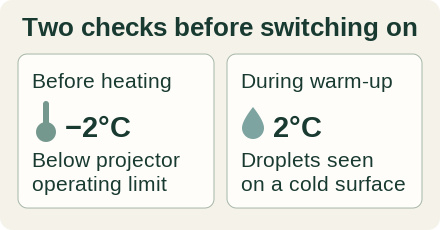
Before heating
−2°C (28°F), 69% RH
Leave the projector off. The temperature falls within its storage range, subject to non-condensing conditions, but is below its operating minimum. The Garmin is below its charging minimum.
Partway through warm-up
2°C (36°F), 76% RH, nearby droplets
Keep the projector off until you’ve checked the unit and the area around it for condensation. The air has reached the projector’s temperature range, but the nearby droplets show why temperature alone is insufficient. Keep the Garmin unplugged until it reaches its charging range.
In this example the owner can move portable electronics to a suitable indoor storage spot and reassess the garage before using the fixed projector. If the garage cannot reliably stay within the fixed equipment’s limits during use and storage, change the room conditions or choose equipment that can be removed.
Does the room need heating, ventilation or a dehumidifier?
- Heat or cool for operating temperature. Check when and where the room crosses a device’s range. Have a qualified installer confirm suitability and positioning, including any effect on the club path, projector beam or sensor.
- Ventilate for air exchange. Record whether ventilation is available with the playing layout set up. Keep existing vents unobstructed and include ventilation in the brief for any room work. England’s Approved Document F collection covers applicable ventilation guidance for building work. In the US, describe the proposed use and work to the relevant local building office.
- Dehumidify when the room needs moisture removed. Compare the proposed unit’s operating temperatures and drainage route against the room. ENERGY STAR distinguishes cool-room models, capacity and condensate handling. Resolve water entry and check whether the room still needs ventilation.
Plan heating and ventilation for a detached room Check a basement layout