
Which software will run your home golf simulator?
Decide what you want to play before buying a computer or course subscription. A Garmin R10 can send shots to Awesome Golf on a compatible iPad or to GSPro on a compatible Windows PC. Check what each route costs and what you already own.
Compare your two routes Check the renewal costs Check Bushnell Launch Pro Uneekor courses
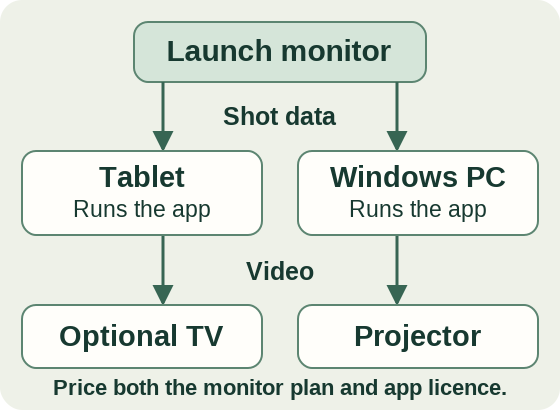
Which app runs the sessions you want to play?
Practise into a net
Use a compatible phone with the Garmin Approach R10 and Garmin’s Driving Range feature. Garmin offers range practice without a paid membership. Register a shot there before adding course play or a bigger display.
Play courses without a PC
With Garmin Golf membership, play Home Tee Hero on the R50 itself or pair the R10 with a compatible phone and use the standalone Home Tee Hero app.
Play rounds in GSPro
Choose a supported monitor and a Windows 10 or 11 PC. The R10 can pair with the PC directly by Bluetooth. Check the PC at the resolution you plan to use.
Garmin simulator features · Garmin R10 phone app and R50 on-device mode · Garmin R10 to GSPro connection · GSPro requirements and supported devices
Can I use an iPad I already own?
An iPad can work if the app supports both it and the monitor. Awesome Golf documents a Bluetooth connection between the R10 and a compatible iPad. Check your iPad model and operating system against its host list, then follow Garmin’s first-time registration steps and try the app. Awesome Golf says its own licence applies after the trial and describes Garmin Golf membership as optional for this pairing. E6 Connect also has a PC and an iOS version. Verify your monitor and the licence’s platform before paying. A GSPro installation needs Windows. Awesome Golf R10 pairing · Awesome Golf iOS compatibility · Awesome Golf licence and Garmin membership · E6 Connect requirements · GSPro requirements
For a Mac or Android device, start with the app’s compatibility page and the connection guide for your specific monitor. Awesome Golf publishes an Apple Silicon Mac route and lists an Android route for the R10. If you are reusing a TV, check how the host will send video to it. Try reading the shot data from the tee and check the image shape and delay while the monitor is connected. With a compatible USB-C iPad and HDMI adapter, test the TV input during a real session before deciding whether to mount it. Apple iPad display connections · Awesome Golf macOS compatibility · Awesome Golf R10 host and connection options
Can guests play or use it offline?
Garmin documents up to four players on one monitor and one Garmin account in a Home Tee Hero round for the Approach R10 or R50. Home Tee Hero requires a Garmin Golf membership. For a shorter family game, Awesome Golf’s Super Splash scores six chips per player. Its guest mode lets you add players by name without separate profiles. Guest shots and personal bests stay unsaved and guest scores are ineligible for leaderboards. Use the garage fit planner to check each golfer’s tee position and walking space. Keep waiting players and spectators outside the swing, errant-ball and rebound paths. Garmin’s local play rules · Awesome Golf Shootouts · Awesome Golf guest mode
Which Awesome Golf courses work offline?
On a supported FlightScope or Uneekor monitor, Awesome Golf lists four nine-hole choices for offline Virtual Golf: Spring Park Hills, Island Beach, Desert Canyon and Valley Pines. Connect the monitor and reach the main menu while online so the app can check the licence and registration. For a bay with patchy internet, start online, then check a complete hole after the internet drops while keeping the local monitor connection active. The licensed 18-hole courses need internet and your offline statistics won’t save. An R10 paired by Bluetooth does not qualify for this offline mode. GSPro lists a stable internet connection among its requirements. Awesome Golf’s connection and offline rules · Awesome Golf’s nine-hole catalogue · GSPro connection requirements.
What PC do I need for 1080p or 4K?
Write down the resolution you want to play at and the graphics hardware in the exact PC you plan to buy. GSPro’s higher 1080p recommendation gives the RTX 3070 or RTX 3060 Ti as examples and calls for 16 GB of memory. Its 4K recommendation calls for 32 GB and an RTX 3080 or better. Check the manufacturer’s own software requirements as well, including ports. For example, Uneekor lists a dedicated Ethernet port among its minimum PC requirements. GSPro requirements by resolution · Uneekor PC requirements
Once the bay is ready for shots, test the monitor’s own practice mode, then your chosen app and its picture on the final display. If the app sees a shot and the projected picture looks wrong, check the video output on the device running the app, the projector’s selected input and the resolution.
Choose the E6 edition before buying a licence
E6 Connect
Start here if your monitor came with E6 Connect courses or you want to use an existing iPad. TruGolf documents Windows and iOS connections for specific devices. For example, an R10 can use Garmin Golf to pass shot data to E6 Connect on iOS. Check the platform and entitlement on the actual licence. TruGolf’s public Connect page requires a login to see current plan prices. E6 Connect plans · TruGolf’s R10 and iOS connection
E6 Golf 2026
Use TruGolf’s Windows PC route for the newer edition and verify the exact monitor. Its published minimum includes 64-bit Windows 10, a 10th-generation Intel Core i7 or newer, 24 GB RAM, a 12 GB RTX 3060 and an NVMe SSD. On 21 November 2026, TruGolf listed US annual prices of $300 Play for courses, $150 Improve for practice tools and $450 Enjoy for both. Confirm the checkout currency and total for a UK account. TruGolf’s plans and PC specs · R10 connection for E6 Golf 2026
Suppose you own an R10 and want courses on an iPad. Check the E6 Connect entitlement in your account and test a real shot in that app. For E6 Golf 2026 on Windows, check your PC against the requirements and activate that edition’s demo before paying. Ask what happens to any included or existing licence if you change editions. TruGolf’s separate demos
Match your device and host to the E6 licence before buying courses or agreeing to a transfer.
Can Bushnell Launch Pro run GSPro without a subscription?
GSPro’s official Bushnell connector requires paid Gold on the Launch Pro and a separate GSPro subscription. A Gold trial does not unlock this connector. Register the Launch Pro to your account and verify paid Gold before buying or switching a GSPro licence. The GSPro connector page gives a licence update tool if you already subscribe. GSPro’s Launch Pro requirements · Foresight’s device registration steps
For a new US buyer on 21 November 2026, Bushnell’s current product page listed a 30-day Foresight+ trial, Silver at $199 per year and Gold at $599 per year. Foresight lists basic data views on Free and requires Silver or higher for Launch Pro club data. The $250 annual GSPro subscription brings the Gold and GSPro total to $849 per year before any tax. Existing continuously active Launch Pro Gold subscriptions may retain their prior rate under Foresight’s migration terms. Check the actual renewal in your account. Current US Launch Pro pricing and inclusions · Launch Pro club-data eligibility · Foresight’s rules for existing subscriptions
For a UK bay, check regional eligibility first. Bushnell says Launch Pro is designed for use in the US and needs an internet connection in the US at least once every 45 days to keep app and software access. Use the beside-ball guide to compare locally supported models and check the software rights for the exact unit sold in your region. Bushnell’s geography and connectivity terms
Look up the exact launch monitor in the GSPro connector guide and check the memberships needed on that route.
Choose the simulator edition of TGC 2019 or FSX
Start with the exact launch monitor and the courses you want to play. TGC 2019 for Simulators uses ProTee’s simulator interface and activation. The 2K game The Golf Club 2019 Featuring PGA TOUR is a separate consumer release. FSX is Foresight Sports’ software family, with separate applications and course access rules. ProTee’s simulator activation guide · 2K’s consumer game announcement · Foresight’s existing-licence policy
TGC 2019 for Simulators
In March 2025 ProTee said it had stopped selling TGC 2019 directly. TGC ownership transfers ended on 1 January 2025. For a used hardware bundle, price the hardware on its own. If you already own the software, keep your key and test a shot on the Windows PC using your monitor’s documented interface. For any fresh retailer offer, verify that it supplies a new simulator code in your name and that the supplier can activate it on your exact monitor. ProTee’s dated sales statement · ProTee’s transfer rules · ProTee’s simulator activation guide
FSX 2020, FSX Play and Foresight Premier
Keep an existing Windows FSX 2020 installation if an entitled course still runs there. Foresight no longer actively supports FSX 2020. FSX Play is a separate Windows course-play application and remains usable for existing owners. Premier is Foresight’s current platform for new features. Check the exact device and account, then open the course in Premier before switching. Foresight+ Silver or Gold is required for converted purchases in Premier. The maker includes Silver and Course Pass for eligible FSX licence holders. A purchased course can stay playable in FSX even while its Premier version is unavailable. Foresight’s existing-licence policy · FSX 2020 Windows installer guide · FSX Play user manual · Foresight’s course eligibility policy · Foresight’s Premier hardware and account guide
UK TGC example. On a SkyTrak+, use ProTee’s current SkyTrak interface, which also covers SkyTrak Original. Save an existing licence key before updating the interface. For a fresh sale, ask for the full GBP price including applicable VAT and confirmation that your SkyTrak+ can activate the supplied simulator licence. ProTee’s SkyTrak interface guide · ProTee’s transfer rules
US examples, checked 22 November 2026. VisGolf displayed $925 for a fresh TGC 2019 activation. A Mevo+ buyer can ask the seller to confirm the FlightScope-specific route and test an actual shot after activation. If you already have a GC3 Essentials Bundle, Foresight documents 25 titles across FSX 2020 and FSX Play, with a different list for each. Willow Crest Golf Club appears in both lists. Look up your chosen course before installing or paying again. For a private-sale GC3, verify any FSX licence and courses in your own account before assigning them value. US simulator licence listing · ProTee’s FlightScope setup · Foresight’s GC3 Essentials course and activation lists
Before buying, test a shot and open one course in the exact edition you intend to keep. Compare the Windows requirements and check the GSPro connector and licence route if you want a separately supported alternative.
Compare course libraries by edition
Largest published count in this comparison. Garmin Home Tee Hero leads these four current publisher figures with more than 43,000 preloaded courses. Rapsodo Core advertises more than 30,000 simulated courses on mobile and PC for MLM2PRO and MLM2XPRO. Its Studios library has separate scanned courses. Compare the same two course titles in the actual apps before buying. Garmin’s enhanced courses, TruGolf’s generated courses and GSPro’s community builds are different offerings. Garmin’s Home Tee Hero count · Rapsodo’s Core course figure.
- Garmin Home Tee Hero. Garmin lists more than 43,000 virtual courses and identifies enhanced courses separately. Confirm access through Garmin Golf membership and the route for your R10 or R50. Garmin’s Home Tee Hero announcement
- E6 Golf 2026. TruGolf lists more than 15,000 courses for its Play plan, including on-demand generated courses. E6 Connect sells separate course entitlements. Check the title and edition in your account before buying either. TruGolf’s library and plans
- GSPro. The publisher lists more than 2,500 community-created courses alongside official offerings. Check the exact downloadable course and your Windows and launch-monitor route. GSPro courses and compatibility
Already have The Golf Club 2019 for Simulators? ProTee reported hosting 150,000+ courses in January 2025, and separately lists 29 titles for offline use. Open your intended titles in your installed version. In March 2025 ProTee said it had stopped selling TGC 2019 directly. Its support FAQ says ownership transfers ended on 1 January 2025. ProTee’s dated statements · Transfer terms · Offline course list.
Buying a fresh TGC 2019 licence. VisGolf advertised a new activation code and licence at $925 with a cart option. ProTee’s setup also requires a machine ID. Confirm the seller can issue a fresh code and the publisher can activate it for your exact monitor before paying. For example, ProTee’s documented FlightScope route is for Mevo+ and X3, and Uneekor uses a separate connection workflow. VisGolf’s advertised new activation · ProTee licence-key instructions · ProTee’s FlightScope setup · Uneekor’s connection guide.
Find a course in Uneekor’s library
- GAMEDAY. Uneekor’s live catalogue lists Pebble Beach Golf Links and Rams Hill Golf Club. Look up the exact name in the GAMEDAY course list.
- Refine and Refine+. Uneekor describes these as South Korean courses. Check the five-course Refine catalogue or the 20-course Refine+ catalogue. Pro includes Refine and Champion includes Refine+. Basic VIEW practice and third-party apps have separate access. Uneekor’s explanation of each app.
If you want to play Pebble Beach. Check GAMEDAY for the course, then confirm the entitlement on the account attached to your monitor. On 21 November 2026 Uneekor’s UK plan page listed Ultimate with GAMEDAY at £453.95 a year. Its US page listed Ultimate at $599 a year. Both pages also list standalone GAMEDAY at US$199 a year. That’s the cheaper listed route if your device and account are eligible and you only need GAMEDAY. The UK page prints that standalone price in US dollars. Check your UK checkout for the sterling total. GAMEDAY requires two displays. The course catalogue is published on the US site. UK buyers can use it to find the title, then confirm access in their UK account before paying. UK membership and display requirement · US membership and display requirement.
Can open-source software use your launch monitor?
Open-Birdie is an independent MIT-licensed project. It documents an Electron desktop app and a Windows workflow with the Uneekor EYE MINI LITE, Uneekor VIEW and GSPconnect using the GSPro Open Connect protocol. On 21 November 2026, its public Releases page showed no packaged download, though the project includes build scripts and specifies Node.js 22 or later. Check your monitor and connector’s software terms before testing it. Open-Birdie code and setup · MIT licence · Release status · Build requirements
Course geometry comes from OpenStreetMap. A course needs mapped hole routes to be playable, and the project lists limits in its flight model and wind controls. Test one known course and one real shot on the exact monitor before relying on it for a round. If you want an installed app and a published support path, budget for a compatible commercial edition. Open-Birdie’s documented limits
What will you pay for software each year?
Check whether the monitor maker charges to unlock third-party apps, then price the app licence or subscription separately. A bundle may cover both for a time. Write down when each licence ends and which features you can still use after it expires.
Take a US buyer with an Uneekor EYE MINI LITE, an eligible account, a suitable PC and no existing subscriptions or introductory credits. GSPro lists the monitor. On November 21, 2026, Uneekor listed Pro with third-party access at $199 per year and GSPro listed a direct subscription at $250 per year. Buying them separately came to $449 for one year. Uneekor also listed annual Pro+ at $299, including one year of GSPro, a $150 difference at the listed prices. These amounts are for software in USD before any applicable tax. Check your account’s offer, local currency and next renewal before using it in a budget. Uneekor US membership prices · Uneekor Pro+ activation · GSPro subscription and device list
Uneekor’s activation guide says GSPro requires a payment method when you redeem the included year. GSPro renews separately at its then-current rate unless you cancel with GSPro. Put the GSPro renewal on its own line beside the Uneekor membership renewal before you compare year two. If you already have a paid GSPro key, check the overlap with GSPro before redeeming the code. Uneekor says buying Plus or redeeming a new code leaves the separate subscription in place. Uneekor’s Pro+ redemption and renewal instructions
If you already pay for GSPro and both renewals are due, keeping GSPro at $250 and adding Uneekor Pro at $199 would total $449 at those prices. Buying Pro+ for $299 alongside that same separate $250 charge would total $549 if both were billed in full. Check your two renewal dates and any credits before changing the Uneekor tier. The initial $150 saving applies when the bundled GSPro year replaces a separate purchase. Uneekor’s current plan prices · Uneekor’s existing-key and renewal guidance
UK worked choice for an R10 and an iPad
On 21 November 2026, the UK Apple App Store listed Awesome Golf Simulator Annual Subscription at £149.99 and Lifetime License at £299.99. Awesome Golf supports the R10 over Bluetooth on a compatible iPad. The vendor describes UK software prices as including applicable sales tax. This comparison uses the two prices displayed on that one UK storefront. Check the in-app checkout for introductory offers and the price at which the annual subscription renews. UK App Store listing and named purchases · Awesome Golf regional prices and tax scope · R10 and iPad connection
At those listed prices, two annual terms total £299.98. A third term brings the total to £449.97 if the annual rate stays the same. Use the annual option if you want to review the setup each year and remember it renews until cancelled. The lifetime licence is a single purchase tied to the launch monitor. If you replace it, use Awesome Golf’s transfer process. Check the terms for your existing monitor and the replacement before you switch. Apple UK subscription terms · Awesome Golf licence terms · Launch monitor licence transfer
The US App Store showed $159.99 annually and $299.99 for lifetime access on 21 November 2026. At the displayed prices, two US annual terms total $319.98, so the lifetime purchase is $19.99 less at two years. Compare checkout tax and monitor transfer terms on your own account. UK Uneekor prices are a separate comparison. Uneekor UK listed Pro at £150.81 per year and Pro+ at £226.60 per year, with one GSPro year listed under Pro+. Check the renewal and any direct GSPro charge in your own billing currency before comparing. US Awesome Golf prices · Uneekor UK plans
Can you keep your tablet or PC?
Copy both routes into your quote sheet. Use one currency and tax basis, and leave any unpriced item open until you have a quote.
Reuse your tablet or computer
- Fit. Record the monitor, app and host model. Check the host’s current operating system and the monitor and display connections.
- First year. Mark the host as owned. Add cables or adapters, then the maker and app fees after any included term.
- Next year. Write down each renewal amount, date and cancellation route.
- Test. Register a shot in the app and read the result on the intended display from the tee.
Buy a new host for the app
- Fit. Record the monitor, app, new host and graphics output. Match the full spec to your resolution and connection.
- First year. Add the host, cables and adapters, then the maker and app fees after any included term.
- Next year. List separate renewals and any included access that ends.
- Test. Try the host and app at the intended resolution before committing to a monitor or display mount.
For a second-hand monitor, confirm in writing which account access and software licences transfer with its serial number. Use the actual billing currency for your UK or US quote.