
Choose a computer for golf simulator software
Price the PC for the app and picture you intend to use. A desktop that runs GSPro at 1080p can fall short of Foresight Premier’s 4K graphics requirement. If you already have a laptop, check its dedicated graphics memory and test it with the display and cameras you’ll use.
Compare the requirements Compare two PCs Count your connections
PC requirements by app and resolution
Find the exact app and edition on your launch monitor’s support page. Match the requirements for the picture you intend to send, such as 1920 × 1080 or 3840 × 2160. A 4K picture has four times as many pixels as 1080p. If your 4K TV accepts a 1080p input and upscales it, try that picture in the bay before paying for a PC that can render the game at 4K.
| Software | Minimum or first useful target | Higher settings or different host |
|---|---|---|
| GSPro | Windows 10 or 11. Recommended 1080p minimum includes RTX 3060-class graphics, 16 GB RAM and 10 GB free. The publisher FAQ labels the card “GTX 3060”; its detailed guide calls it RTX. | Preferred 1080p: RTX 3060 Ti or RTX 3070, 16 GB, 20 GB free. Preferred 4K: RTX 3080 or better, 32 GB, 20 GB free. Model support and a stable internet connection matter too. GSPro published minimum and recommended requirements · Desktop and laptop detail |
| E6 Connect | Use the PC or iOS build and the requirements for that edition. Check the sensor’s integration and the licence before using iOS. | The publisher’s older E6 Connect and newer E6 Golf 2026 have separate installers and hardware targets. E6 Connect installer and system compatibility |
| E6 Golf 2026 | TruGolf publishes Windows 10 64-bit, 10th-generation Intel Core i7 or newer, 24 GB RAM, RTX 3060 with 12 GB VRAM and an NVMe SSD as minimum. | Windows PC at the check date. Confirm the exact CPU class and GPU memory with TruGolf before substituting a mobile or AMD system. E6 Golf 2026 system requirements |
| Foresight Premier | 1080p Low reference desktop: Windows 10 or 11, Intel i5-12500, RTX 4060 with 8 GB VRAM, 16 GB RAM and 50 GB available on SSD. | Foresight’s 4K reference specifies Intel Ultra 7 and RTX 4080 or RX 7900 XTX with 16 GB VRAM or better. Premier’s separate 4K reference can rule out a PC bought for GSPro. Foresight Premier specifications |
| SkyTrak+ and SkyTrak MAX | SkyTrak’s v5+ page lists Windows PC, M-series iPad and Apple Silicon Mac paths. Its PC minimum is i3-10100F or Ryzen 2600, GTX 1650 or Radeon 580, 8 GB RAM and 128 GB SSD. | The PC recommendation calls for 16 GB RAM and 500 GB SSD. For its 4K graphics profile the page calls for RTX 2060 or RX 6600 with at least 8 GB graphics memory. Check how much dedicated memory the exact card includes. Some model names cover several memory configurations. SkyTrak+ and MAX system requirements |
| Trackman Performance Studio | Start with the hardware table for Trackman iO, iO DUO or Trackman 4. The PCs have model-specific CPU, GPU and wired network requirements. | Check the 4K and network requirements for that device. If a seller bundles a PC, ask for its written specification so you can compare. Trackman PC requirements |
For GSPro, the published host is Windows with the listed graphics class and input connection. A Raspberry Pi, Chromebook, Mac or iPad is therefore outside the documented GSPro host choices. Some named first-party apps can run on tablets or directly on the launch monitor. Check the existing-device display options before buying a PC for a basic practice bay. GSPro published minimum and recommended requirements · SkyTrak+ and MAX system requirements
Compare a desktop with a laptop
UK fixed desktop with a 4K GSPro target
Scan listed its 3XS Edge RTX LN156588 for £2,299.98. The listing identifies a Ryzen 5 9600X, desktop RTX 5070 with 12 GB VRAM, 32 GB RAM, a 2 TB SSD and Windows 11. GSPro’s desktop guide names the RTX 5070 in its 4K list. If the price holds and advertised free delivery applies, that is the PC line before a GSPro key, output cable, display and any monitor-side plan. The desktop’s 12 GB graphics card falls short of Foresight Premier’s 16 GB target for 4K. Check the basket for the configuration, storage, ports and warranty you expect. Scan 3XS Edge RTX LN156588 · GSPro desktop and laptop notes · Foresight Premier specifications
US laptop for a bay that gets packed away
Dell advertised a selectable $1,999.99 Alienware 16 Aurora configuration with a Core 7 240H, RTX 5060 laptop GPU, 32 GB RAM, 1 TB SSD and Windows 11. For a 1080p projector, check that the app supports the laptop GPU and power settings, or test the laptop on mains power while you can still return it. Compare the configuration in your cart with the displayed options, because the same product family also starts from an RTX 4050 configuration. With one year of GSPro at $250 the laptop and game would cost $2,249.99 before tax and other setup items. The RTX 5060 laptop GPU is an 8 GB class, so this is outside E6 Golf 2026’s published 12 GB minimum. Verify power, outlet and display before fixing cables. Dell US Alienware 16 Aurora configuration list · GSPro desktop and laptop notes · GSPro published minimum and recommended requirements · E6 Golf 2026 system requirements
Choose a tower when it can stay ventilated behind the protection and you want a serviceable graphics card. Choose a laptop where the PC needs to move. For a shared laptop, test it while connected to the manufacturer’s power adaptor. Check the GPU name, dedicated graphics memory and sustained power in the exact configuration. A mobile card and desktop card with the same name have different power limits. GSPro desktop and laptop notes
Ports for the monitor, cameras and display
| Connection | Example | What to confirm |
|---|---|---|
| Monitor data | Uneekor EYE MINI LITE to PC by Ethernet | Keep the unit’s port available and verify how the PC stays online at the same time. If you add a network interface, give the installer both models. EYE MINI LITE connection manual |
| Monitor data | Garmin Approach R10 to GSPro over Bluetooth | Confirm working Bluetooth and enable the published R10 connection mode. Check range around the PC enclosure and tee. Garmin R10 to GSPro |
| Picture | Discrete desktop graphics output to TV or projector | Use the GPU output on a desktop. For a laptop, check which port drives the external display and the resolution and refresh mode your cable can carry. |
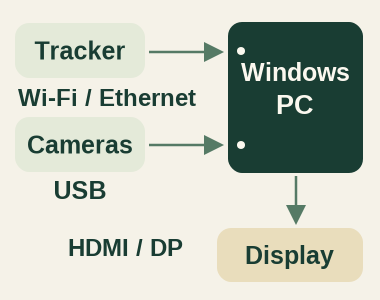
| Replay and control | Two USB cameras plus keyboard and controller | Count independent usable USB ports with the cameras active at once. Keep storage free for footage and check whether your replay app auto-triggers from shots. |
- Plug in the actual monitor, display and replay hardware at the same time. Run the computer on mains power if it is a laptop.
- Set Windows and the simulator to the resolution you plan to use. Load a representative course, hit several shots and watch for dropped connections or visible stutter.
- Record both replay views while the course is running. Shut down, restart and check that the monitor and cameras reconnect. If reducing the resolution fixes stutter, write down the setting and try the same course again before replacing equipment.
Check your GSPro connector Plan the replay camera Compare simulator apps