
Square Golf Home vs SKYTRAK+ indoors
Square Golf Home and SKYTRAK+ both sit beside the ball. Check where each one reads a shot and what you’ll need to measure spin or club data. If you play rounds, count how many holes you and your guests are likely to play.
Mark the correct side position for each model
This comparison covers Square Golf Home and SKYTRAK+, which SKYTRAK also calls ST+. Tape the tee position on the mat and mark where each monitor will sit with its case fitted. If the bay serves right- and left-handed golfers, check the device height and keep the route between the two positions clear.
Square Golf Home
Match the device to the 15 × 15 cm hitting area in Square’s setup guide. Plan around its orientation and keep direct sunlight away from the monitor as directed. Check the handedness setting and repeat the setup for each side. Square Home setup · Square Golf setup and handedness FAQ
Square specifies marked balls for measured spin on Home Edition. Its UK support describes club stickers for extra club feedback. The Square app offers putting practice and credit-funded course play. Square Home spin requirements · Square Golf UK support · Square practice modes
SKYTRAK+
Place the unit level with the hitting surface and parallel to the target line. Use the projected red dot as the position for the ball or the base of the tee. SKYTRAK describes a photometric camera for ball data and dual Doppler radar for club data. ST+ quick start · SKYTRAK+ specifications
SKYTRAK recommends a clean white ball with the logo or a marked line facing the unit for better spin readings. For putting, check the exact course app, match settings and practical read in a demo with this model. SKYTRAK ball positioning · SKYTRAK match settings
Worked choice for two golfers sharing nine holes
UK course prices were checked 21 November 2026. The example assumes a new Square Home with its 1,000 welcome credits, or an ST+ with no course plan included. Budget separately for the monitor, balls, the device running the app and any third-party software.
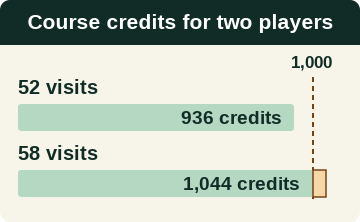
- Square Home for 52 visits. 2 players × 9 holes × 52 visits = 936 credits. That leaves 64 of the welcome credits and costs £0 extra for these rounds.
- Square Home for 58 visits. Six more visits add 108 credits. The total reaches 1,044 credits. A £2.99 pack of 100 covers the 44-credit shortfall and leaves 56. After the welcome credits are gone, a fresh 1,000-credit pack was listed at £19.99. Square Golf UK credit prices
- ST+ for either schedule. SKYTRAK confirms Course Play on the ST+. Its UK Core (FS) annual plan displayed a £268.40 first-term sale price, with 50+ Foresight courses including Pebble Beach. Check the next-term price before buying. ST+ Course Play compatibility · UK Core (FS) plan and library
Look up the courses you’ll play before comparing the bill. Square’s first 1,000 player-holes apply to Square courses, and the SKYTRAK plan covers its own library.
Compare the exact Square and SKYTRAK models on the quote
Square Golf Home Edition and Square Golf Omni Edition have different ball and setup requirements. On the SKYTRAK side, check whether the quote names the original (OG), ST+ or ST MAX. The checks below compare the published hitting zones and features. Test the same shots on the actual mat before judging read reliability or accuracy.
Square Golf Home vs original SKYTRAK
Square Home is designed for indoor use. Square lists a 15 × 15 cm hitting zone and calls for its marked balls for measured spin. The original SKYTRAK lists a 2 × 2 in zone. For two marks 3 in apart on one axis at the same device position, shortlist Home: the marks can fit within 15 cm on paper and exceed the original’s 2 in span. If you already own the original and one mark works, test the shots and courses you use before paying for a replacement. Lay out and test both stations if you switch hands. Square Home specifications · Square ball and handedness rules · Original SKYTRAK specifications
Square Golf Omni vs SKYTRAK ST+
Omni’s manual gives a 25 × 25 cm Ready Zone. ST+ lists about 2 × 2 in. If two marks are 3 in apart along one axis and the monitor stays put, trial Omni with both marks in the recommended area. With one repeatable mark, demo ST+ if its listed club path and face data are what you use. Both manufacturers allow outdoor use. Square describes Omni use on natural turf and advises keeping strong direct sun out of its lenses. For ST+, SKYTRAK recommends a mat or hitting from a tee outdoors because turf debris can disrupt capture. Square says Omni can read spin with an unmarked ball and specifies club stickers for full club data. Omni Ready Zone and club capture (PDF) · Omni surface guidance · Square sunlight limits · Square ball and club requirements · ST+ specifications · SKYTRAK surface guidance
Square Golf Omni vs SKYTRAK ST MAX
For an indoor bay with ball marks 5 in apart along one axis, the gap exceeds ST MAX’s published 4 × 4 in zone and fits inside Omni’s 25 × 25 cm Ready Zone on paper. Check whether both positions capture the club data you want. Square says capture can depend on where the ball sits within the Ready Zone. If one mark works and guided Speed Training is important, trial the ST MAX and confirm access on the quoted plan. The ST MAX listing specifies indoor use. If outdoor practice is part of your week, trial the Omni under the lighting you expect. Omni setup and club measurement (PDF) · ST MAX hitting zone, location and Speed Training · Omni outdoor rules
Square Golf Omni vs original or unspecified SKYTRAK
If the seller means the original SKYTRAK, compare its 2 × 2 in zone with Omni’s 25 × 25 cm Ready Zone and built-in shot readout. The original’s product table lists indoor use. SKYTRAK’s support also describes outdoor mat use with direct sunlight kept off the lens and recommends bringing the unit indoors after use. If one tee position serves your practice, test your original on the intended outdoor mat before upgrading. Trial Omni if you need a larger usable zone, natural-turf practice or shot numbers on the unit. If the quote only says “SKYTRAK”, ask the seller for the model shown on the unit. The ST+ and ST MAX checks above depend on that distinction. Original model specifications · SKYTRAK outdoor mat and sunlight guidance · SKYTRAK outdoor care · Omni manual (PDF) · Omni display and use conditions
Check the account before changing brands or buying used. Square documents 1,000 welcome credits for Home and Omni devices, and course play spends credits by player-hole. These examples use new-device access. Confirm the actual balance and access if the unit is used. SKYTRAK confirms Course Play on the original and ST+ with the supported software and plan, and documents moving a membership from original SKYTRAK to ST+ through Clubhouse. Check the plan in your own account for ST MAX or any used unit. Compare the specific courses, separate third-party licence and renewal you’ll use before moving. Square device credits · Square player-hole terms · SKYTRAK original and ST+ Course Play · SKYTRAK Clubhouse upgrade route · ST MAX software terms
Compare how each app counts a putt
Square Home. The Square app’s Putting Practice uses a real ball and needs no club stickers. For long-shot club data in the Home model, apply its supplied stickers as instructed. Square lists standard club data such as club path, face to target, attack angle and dynamic loft. Its model table distinguishes Home from the extra Omni metrics. Square model and app feature tables.
SKYTRAK ST+. The model’s product page lists club head speed, smash factor, club path, face angle and face-to-path. SKYTRAK’s 6.x Course Play offers Putt it Out, automatic scoring and several gimme settings. The menu tells you which modes the app offers. To find out how short a putt the ST+ picks up, turn off automatic putting and gimmes in the app and plan you’ll use. Try your shortest real putt from each of your tee positions. ST+ exact club metrics · SKYTRAK Course Play putting settings.
Try Square if dedicated putting practice is the priority. If you already use SKYTRAK’s course and club tools, use the actual putt test to decide whether the shorter shots in your bay work in that app. Plan the physical putting lane.
Compare a used UK ST+ with a new Square Home
On 21 November 2026, an Epsom seller showed a used ST+ at £1,047.67 or Best Offer. The purchase panel showed an error. Square UK’s new Home displayed £699.99, a £347.68 difference against the ST+ ask before delivery and software. Check the serial on the ST+ base, whether it can be registered to your Clubhouse account and what course access it needs. Compare a physical putt and club data on both before paying a premium for the used unit. Used Epsom asking price · New Square Home listing · SKYTRAK model and account registration.
Check the app on the computer or tablet you own
For Square Home, one third-party route is the Square connector for GSPro on a compatible Windows PC, with a separate GSPro licence. You can also run the maker’s Square app on a supported iOS or Android device or Windows PC. For ST+, one first-party route is SKYTRAK Course Play on a Windows PC that meets the listed Core (FS) requirements. The UK Core page also lists compatible Apple and Android devices with separate requirements. Square connector and host instructions · SKYTRAK Core (FS) system requirements · Compare simulator software and hosts
Test your usual session before paying
Give the seller your tee positions, finished mat height, app and device, and expected player-holes. Ask to see an ordinary shot and the shortest putt you’ll play. Check which ball and stickers the demo uses, then get the price of keeping those features after the trial.