
Putting on a home golf simulator
If you want to hole out with a real ball, try the shortest putt you expect the launch monitor to read before you buy turf. If the room or monitor can’t manage that roll, let the game finish the hole or use a separate mat for putting practice.
Which home simulators read a putt?
Garmin R50 or R10
Use the Approach R50 if you want a physical putt in Garmin’s own simulator. Enable Putting and test a virtual putt beyond the selected Gimme Distance. On the Approach R10, Home Tee Hero adds up to three strokes based on the approach shot’s finishing distance. That R10 mode has no physical putting. Garmin R50 round settings · Garmin R10 scoring
The R50’s built-in driving range and the R10’s range in the Garmin Golf app are available without a paid membership. Home Tee Hero course play requires an active Garmin Golf membership on both models. Garmin range and simulator modes · Garmin’s Home Tee Hero membership terms by model
Square Golf Home
Use Square’s Putting Practice for virtual distance and pace drills. The maker lists fixed, increasing and random distances, flat or sloped greens and a virtual green speed of 8 to 13 on the Stimp setting. A plain ball is suitable for this practice mode. In Square’s course mode, check its concede distance and auto-putt settings as a separate step. Square Golf’s practice and round modes
FlightScope Mevo Gen2
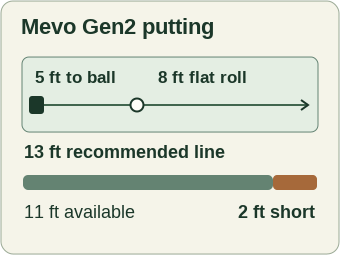
FlightScope lists launch speed, total distance and ball direction in putting mode. Its putting setup calls for 5 ft (1.52 m) behind the ball and recommends at least 8 ft (2.44 m) of flat roll ahead. Measure both in the room and check the putt in the software you intend to use. FlightScope’s model-specific putting space and data
Rapsodo MLM2XPRO or MLM2PRO
The MLM2XPRO supports tracked putting with Core or Studios in the maker’s app. Select the putter and test a soft roll. Rapsodo recommends the normal device distance and quotes about 2.7 mph (4.3 km/h) as the minimum ball speed to register. The older MLM2PRO uses Auto Putt in Rapsodo Courses. Rapsodo putting and memberships by model
Can you putt with 11 ft from sensor to target?
Your clear line from the sensor position to the end of the roll is 11 ft (3.35 m). With a Mevo Gen2 5 ft behind the ball, only 6 ft (1.83 m) remains ahead. That is 2 ft (0.61 m) short of FlightScope’s flat-roll recommendation. Hold off ordering turf for this tracked layout. If your app can finish the hole automatically, use that in rounds and practise on a separate roll-out mat where your putter clears. If you want to putt out during rounds, ask to try a beside-ball model on the surface you expect to use. FlightScope’s putting requirement
Lay a straightedge across the hitting strip, stance mat and proposed putting turf. Roll a ball across the join to see whether it stays on line. If a thick hitting insert or a seam consistently turns the ball, move the putting lane, try a suitable flush assembly, or use a dedicated roll-out strip clear of the swing and walking paths. Choose the floor transition and hitting surface before buying either mat.
Track a putt or let GSPro score it
For the Rapsodo MLM2PRO or MLM2XPRO, Rapsodo’s current plans list third-party connection access from Core. Studios includes that access. Budget a separate GSPro licence on a compatible Windows PC for this route. Rapsodo’s model and membership comparison · GSPro licence and PC requirements
In the round setup, open Gimme/Auto Putt. For physical putting with a compatible monitor, choose Putt Out and test a straight roll. For an automatic finish, use Auto-Putt Fixed or Auto-Putt Random. The fixed option lets you set one-putt and two-putt circles in Game Settings. If you have a separate putting mat, Pick Your Putt lets you enter your physical result. Rapsodo documents that option for the MLM2PRO, and documents tracked GSPro putts for the MLM2XPRO. GSPro round setup · GSPro game settings · Rapsodo’s MLM2PRO guide · Rapsodo’s MLM2XPRO FAQ
To test the equipment, start on a flat virtual line and keep the same green speed. Turn off any automatic aim or putting assistance you would otherwise use to check whether the reported start line follows the physical roll. Add the aids back if they suit your usual round. GSPro putting assists
Price turf for the measured putting lane
UK fitted turf. Golf Sim Solutions lists its Pro Perfection Nylon at £70.40 per m² including VAT, in a 4 m width. It publishes an 18 mm pile and a 10.5–11 Stimpmeter rating. A 4 m-wide × 3 m cut would cost £844.80 for the turf at that rate. Get the backing, subfloor and seam height before cutting around your hitting strip. UK turf specification and price.
US separate putting lane. The Indoor Golf Shop lists the SIGPRO Gimme at $1,099.99, 9 ft 10 in × 3 ft 11 in with an approximately 10 Stimpmeter rating. The longer 11 ft 9 in Tap In cannot fit lengthwise in the 11 ft example above. The Gimme leaves 14 in of room length before checking the putter and your stance. Its raised base is for a separate lane. Keep it out of the path of a tracked putt from the hitting strip unless you can make the transition flush. US Gimme dimensions and price · Longer Tap In dimensions.
The published roll ratings are for different turf setups. Try a sample on your own base and roll a putt across the seam before you decide how the finished lane will play. Prices checked 21 November 2026.
Roll six balls before ordering new turf
- On a clear lane, mark the ball’s start point and a near target. Mark a second target on the same line farther ahead. Keep both safely inside the available roll.
- Use the same ball type and starting spot. Roll three putts to each target. Record how many the device reads and whether the virtual ball starts on the same side of the line as the real ball.
- If slow putts repeatedly drop out, try the maker’s supported position and retest. If both distances drift in the same direction when you roll them without the app, inspect the seam, floor and mat first.
For a separate station with stroke data, a putting-only system such as Exputt RG uses its own camera and mat with an HDMI display. You can also use a plain roll-out mat and a separate start-line drill. Price the putting lane and its equipment separately from the full-swing bay. Exputt RG stroke feedback · Exputt camera and display setup
Plan a putting practice session
Manufacturer and software guidance checked 21 November 2026. The 11 ft lane is an example. Repeat the six-roll check on the surface you’ll use.