
Set up ball return, a feeder and controls for golf practice
If you spend practice sessions picking up balls, try a return net or ramp that brings them back toward the mat. A tray or feeder is for getting the next ball ready. If the interruption is walking to the computer to change aim, check which controls your app accepts.
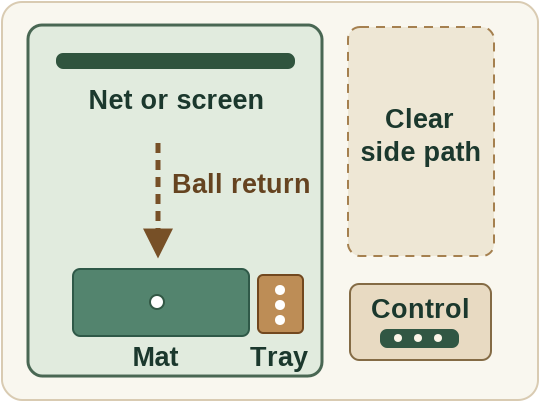
Return nets, ramps and feeders
Recover a ball after impact
A return net catches the shot and guides it back by gravity. The Net Return’s US Pro net showed $636 on promotion at the check. Its frame measures 8 ft wide, 7 ft 6 in high and 3 ft 6 in deep. Allow for the required buffer around the net, and mark the tee and full swing before buying. Check how you’ll protect the sides and where the ball lands on the mat or floor. In a screened bay, the Big Moss TL Putting & Return Ramp helps balls roll over a change in floor height. The maker lists 18 × 36 in and 3 × 3 ft formats. Verify that your mat lip, turf, frame padding and monitor position still work together. The Net Return Pro net · Big Moss return ramp
Put the next ball within reach
A rubber tray keeps loose balls near the mat. InSwing’s UK tray was £58.80 including tax with shipping calculated at checkout. You move the ball onto the hitting spot. For repeated tee shots, Gravity Caddy’s 35-ball feeder uses a gravity arm and comes with an iron mat and rubber tees. Its main body is 320 × 205 × 330 mm. The direct page lists a US-dollar price and shipping to Canada and the US, with possible US import charges. Confirm delivery to your address. Ask where the arm releases the ball and what tee heights it supports, then compare those with your mat and hitting zone. InSwing UK tray · Gravity Caddy specifications and delivery
UK option with a pedal. UK Sport Imports showed the Hillman PGM dispenser in stock at £119.95. It holds up to 100 balls and releases the next ball when you press its pedal with a foot or club. The retailer lists free standard delivery and a 12-month warranty. Check the delivered price for your postcode and measure whether the outlet lines up with your mat and rubber tee. Mark where the pedal goes and where the ball lands, then check that spot against the launch monitor’s hitting zone. Hillman PGM price and terms
Match hand or foot controls to the app
Start at the keyboard. In GSPro, the Left and Right arrows change aim and Ctrl+M takes a mulligan when the game allows it. Check these shortcuts in the mode you play before assigning buttons. Club Keyboard sells different layouts for GSPro, TGC 2019 and OptiShot, with wired and wireless connection options. For FSX Play and E6 Connect it describes a separate mouse-to-key app for actions without usable shortcuts. BA’s V2.5 sends GSPro keys through a USB receiver, with second functions through BA Remapper on Windows 10 or 11. Check the exact layout and host ports before buying. GSPro keyboard commands · Club Keyboard compatibility · BA platform requirements
If you prefer foot input, a programmable USB pedal such as the PCsensor FS23 can send keyboard actions through its ElfKey setup. Map two pedals to your confirmed Left and Right keys and test them with the simulator window active. Leave the third unassigned until you need it. Keep a pedal or handheld remote off the mat where it cannot be stepped on during a swing. On a standalone touchscreen or tablet, check that the app itself accepts the intended input before buying a PC accessory. PCsensor FS23 and programming
Check the side path and control reach
Suppose the side path at your mat is 800 mm wide and the player needs all 800 mm for their route. A feeder body turned with its 205 mm side across the path leaves just 595 mm, before the arm moves. Move the feeder, or try a tray or return path inside the bay that stays clear of the swing and launch monitor. For seated use, check whether the player can reach a hand control on a stable side shelf outside the hitting and rebound areas. Put any pedal where it can be used without leaning or reaching into the swing area. Route wired controls away from feet and wheels.
- Mark the walking route, both stances you use and the sensor’s required view. Move the feeder and arm clear of all three before hitting.
- Keep the ball in the maker’s hitting zone. Test where it stops on your real mat and floor. If the feeder places it out of the zone or leaves required ball markings facing the wrong way, use a tray and set the ball by hand.
- Test changing aim and moving to the next turn from the player’s usual sitting or standing position. Pause play whenever someone needs to collect a ball in front of the hitting line.
Check net containment · Keep the sensor’s view clear · Plan a repeatable session
Supplier listings and software documentation checked 21 November 2026. Prices and availability vary. The side path is a worked example.